Tired of following arrows? This WoW Forever addon explains your quests
Thousands of short lore summaries are added to your active quests.


The use of leveling guides on WoW Forever can cause you to go through the game, blindly following an arrow from one quest to the next without really experiencing the story behind each of them. An addon that adds a short lore summary to the player's quest tracker for each active quest would be wonderful.
That's what QuestLore is for!
Over 5,000 Quest Summaries
QuestLore basically adds a small section below your quests that adds a little summary, such as:
Who you are helping
What is going on
Why you are being sent out
Why you have to do this specific thing
There are currently 5,259 quest summaries you get with the Addon. And they are all available in English and Spanish.
And for those who like knowing about their own background, it even provides race and class intro, with a little summary of your character's place in Azeroth before you start leveling.
So basically, where you are from, and why you have to complete everyone's shopping lists...
 Alejandro Sena@AlejandroSena𝕏
Estuve jugando WoW: Forever desde que salió, usando distintos addons (Polestar y RestedXP) que te guían por las misiones porque hay demasiado que hacer y me pierdo.
El problema de esas guías es que terminás siguiendo una flecha y perdiéndote la historia. Así que creé QuestLore.…
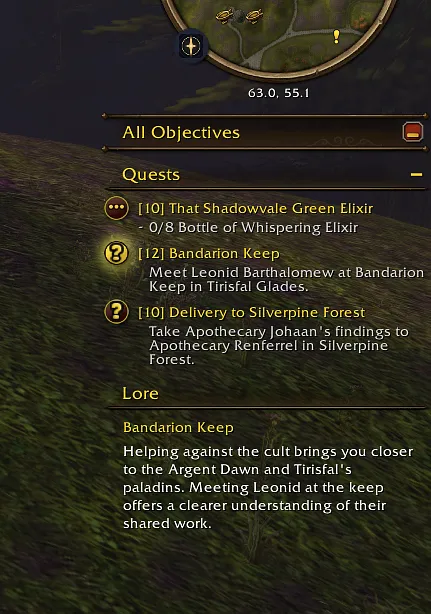
You can use it on its own, or with Polestar as well.
Polestar is a leveling guide addon, and QuestLore can automatically follow the quest that Polestar tells you to do.
The summaries only give you context for your current quest; they will not spoil the next quests. You can read it without worrying about accidentally spoiling what happens next.
It can also store up to 200 summaries per character, so you can even check older quests if you want to.
Where to Download QuestLore
QuestLore is free and open source, with no online AI or translation service required. Here is how to set it up:
You can download it from CurseForge
Once installed, type /lore to open its window or head to:
Options
AddOns
QuestLore
You can then configure the text size, Lore section, the separate window size, and placement.
For more information about WoW Forever, check out our latest news.