Overwatch now lets you block any word you want from chat, and it works in every channel
No need to mute all of chat just because one word keeps showing up.


Overwatch Season 5 recently added a small setting that a lot of players will want to turn on right away → Custom Restricted Words. You type in the exact words or phrases you do not want to see, and any chat message containing them gets hidden. It applies to whispers, group chat, team chat, and match chat.
Although this does not sound like much, it is actually a big deal if you have ever muted chat entirely because of one person or situation. All in all, this feature might be a better option than silencing everything and everyone in-game.
Where to Find Custom Restricted Words
You can find the setting with the other chat filters:
Open Options and go to the Social tab.
Select Text Chat.
Scroll down to the Text Profanity Filters section.
Next to Custom Restricted Words, click Manage Words.
Click Add Word for each word or phrase you want hidden, then hit Done.
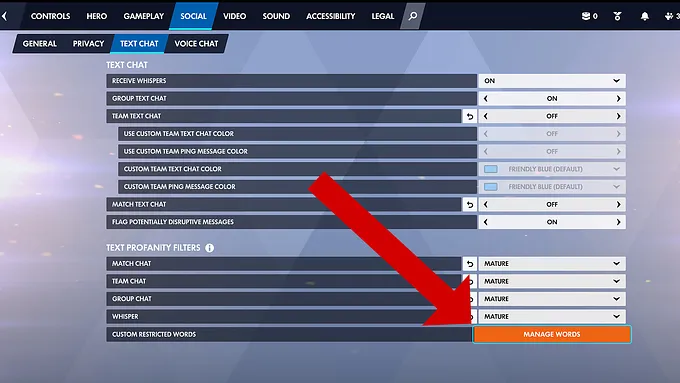
That is it. You can add up to 100 entries, and there is a Clear All button if you ever want to start over. The list applies to all four chat channels at once, so you do not need to set it up separately for each one.
What Happens When Someone Types a Blocked Word
Messages with a restricted word are not deleted. They are hidden behind a "Possible Bad Message (Custom)" warning, and you can reveal them if you want to see the full message. That can help when a teammate uses one of your restricted words harmlessly, and you need the context.
If you stream, there is one extra step, though. With Streamer Mode on, the game asks you to confirm before it shows or lets you edit your list, so your blocked words do not end up on stream by accident. Very useful, indeed!
The Automatic Filter Only Catches So Much
Overwatch already has automated filtering, including the "Flag Potentially Disruptive Messages" option and the profanity filter levels for each channel. Blizzard said in the patch notes that those systems do their best to hide disruptive chat by default, and this new option lets players pick the exact words and phrases themselves.
That is important because no automatic filter knows what bothers you specifically. It could be a nickname you do not want to read or see, ever. Or a word the default filter misses, or something else entirely that you just do not want in your games. Of course, this only hides messages on your screen. It does not stop anyone from typing them, and it does not report them. If someone is being abusive, the report button is still the way to go.
Setting it up takes about a minute. If chat has been wearing you down lately, it is worth that minute.
For more Overwatch news, head over to our Overwatch news hub.