WoW Forever's controller support now covers almost every part of the game
From combat targeting to inventory management, Blizzard has made gamepad support a full part of the experience.

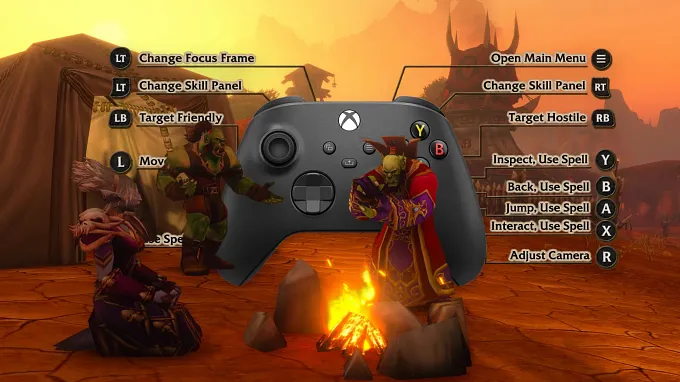
World of Warcraft: Forever is only a little day away, and for those who always wanted to try out the game with a controller, this is now possible.
Forever will let you play almost the entire game with a controller when it launches on November 4.
Blizzard revealed in the latest Development Notes that the gamepad support has reached a "complete functional state", with controller inputs now covering every big gameplay system and main UI features.
And we are not just talking about basic movement and spellcasting.
You really get full controller support for a World of Warcraft game. Who would have thought this day would come? You can use it to fight, manage your inventory, interact with profession trainers, select targets in combat, create a character, and even skip cinematics.
You can now also customize your controller layout through an "Edit Mode" and the main "Options" menu. So you can even adjust the interface the way you want it to be.
Combat, Menus, and Inventory With a Controller
First, the most important: how does combat work with a controller?
There have been a few adjustments, especially when it comes to targeting, enemy players in PvP, and a few fixes when looting:
Added Gamepad support for targeting a previously assigned Focus Target.
LB + RB + Face Down can be used to select your Focus Target.
The target context menu displays Clear Focus when your current target is also your Focus Target.
Friendly corpses can now be targeted with a Gamepad.
Friendly Analog Targeting can target friendly corpses.
Friendly Tab Targeting can target friendly corpses.
Improved Gamepad targeting for critters.
Hostile Analog Targeting can target critters.
Soft Targeting can target critters.
Improved Gamepad targeting of enemy players.
Enemy players can no longer be selected by Friendly Analog Targeting.
Enemy players can be selected by Hostile Analog Targeting regardless of PvP flag status.
Units behind the player can now be selected with Analog Targeting when they remain visible on screen.
Feign Death units that remain attackable can now be targeted if and only if the Gamepad reticle is positioned over them.
Fixed an issue where certain attackable enemies could incorrectly display an Interact icon when using a Gamepad.
Fixed an issue where looting or closing the loot window could leave a corpse incorrectly locked as the player’s target.
Inventory management is probably the second biggest adjustment that controller support received.
Managing your bags should also feel better with a controller. Blizzard has updated the inventory interface to make it easier to see which bags you are using, how much space you have left, and how much ammunition remains. They also improved the controls for searching your inventory and accessing your Keyring.
Fixed an issue where Gamepad focus could move away from the inventory after confirming or canceling the destruction of an item.
Fixed an issue where horizontal Gamepad navigation could behave incorrectly when moving between bag columns of different heights.
Fixed an issue where navigating the inventory with a Gamepad during a trade could cause a Lua error.
Fixed an issue where opening individual bags with the keyboard and mouse UI could cause a Lua error after switching from the Gamepad UI.
Improved bag management when using a Gamepad.
Improved the Gamepad Bag UI.
Added updated visuals and clearer bag states.
Added remaining bag space and ammo count indicators.
Improved bag prompts and interactions.
Improved Keyring navigation and highlighting.
Improved the inventory search layout.
You can even use ground-targeted AoE items from the Gamepad Action Bar. Press the corresponding button again to confirm the placement, just as you would with a ground-targeted spell.
AoE items bound to the Gamepad Action Bar can now be used and placed at a targeted location.
Press the Action Bar button again to confirm placement, consistent with ground-targeted AoE spells.
Fixed an issue where changing the current keyboard and mouse Action Bar page would cause Gamepad Action Bar buttons to be offset.
Fixed an issue where Gamepad Action Bar settings were not immediately reflected while in Edit Mode.
You Can Handle Everyday Activities Without Switching to a Keyboard
The latest changes seem to also cover a lot of these smaller interactions that could otherwise force you to reach for a mouse and keyboard.
For example, you can now navigate the ruleset selection screen with a controller, skip or exit cinematics, and end a flight path early using the Back/Cancel action. Your character will dismount at the next available flight point.
Character Select & Ruleset Selection
Added Gamepad support for navigating and interacting with ruleset selection screens.
Fixed an issue where newly created characters were not automatically selected when returning to the Character Select screen while using a Gamepad.
Cinematics
Added Gamepad support for skipping or exiting cinematics.
Flight Paths
Added Gamepad support for ending a flight path early using the Back/Cancel action.
Players will dismount at the next available flight point.
Navigation and Focus
Fixed an issue where Gamepad focus could be lost from the Options panel after closing a graphics settings confirmation dialog.
Updated popup behavior so non-user-initiated popups no longer automatically steal Gamepad focus.
These popups can be explicitly focused using the View/Select action or equivalent controller input.
Updated Gamepad navigation prompts to use LT and RT button indicators when navigating between supported UI panels.
What About Pets and Professions?

Hunters and other pet classes also get controller support for the Pet Move command.
You can position your pet and confirm its placement using the Interact button or by activating the ability again.
Added Gamepad support for the Pet Move command.
Pet placement can be confirmed using the Interact button or by activating the ability again.
And when it comes to Professions, you can finally use the Train action at Profession trainers, and remove a Profession by holding down the button.
Fixed an issue where Gamepad users could not use the Train action at Profession Trainers when a skill upgrade was the only available option.
Fixed an issue where the Gamepad prompt for removing a Profession did not indicate that the button needed to be held.
Altogether, the controller is now a very good alternative, without having to constantly switch back to the keyboard and mouse for every little action.
Other Adjustments
And of course, things like Tooltips and UI also received an update. You can manage your equipment better, play around with the Color Picker if you want to, and your gamepad tooltips will remain visible.
The Lua error that was popping up with some quests on Gamepad was also fixed, and you can finally see the Off-Hand Swing Timer on dual-wielding characters.
Quests
Fixed an issue where viewing quest details in a different map region with a Gamepad could cause a Lua error.
Swing Timers
Fixed an issue where the Off-Hand Swing Timer could fail to appear after logging in on dual-wielding characters.
Tooltips and UI
Added Gamepad support for adjusting opacity in the Color Picker.
Fixed an issue where Gamepad LB and RB prompts could incorrectly appear in the Equipment Manager while using the keyboard and mouse UI.
Updated Gamepad tooltips to remain visible rather than allowing them to be toggled on or off with the controller.
And last but not least, the Gamepad UI compatibility with Add-ons has been improved. You should now be able to use user-created add-ons without it entering into conflict with the Gamepad UI and causing interface issues.
Having good controller support can definitely bring even more people to play, and it is definitely a nice addition. It is also reassuring to see Blizzard putting in the effort to make it work for every aspect of the game, and not leaving it half-baked as some other games do.
So if you wanted to play with a controller, know that it is definitely ready for launch tomorrow!
For more information about WoW Forever, check out our latest news.