Overwatch Season 5 has a spooky new set of Battle Pass titles
You can obtain a total of eight new Prestige Titles, from Bewitched to Jumpscare.


Spooky season has started, and Overwatch is joining in on the fun as well! Not only can you participate in the new Halloween event, complete scary challenges, and get vampiric rewards, but the Battle Pass also adds its own set of exclusive rewards.
And as always, if you manage to complete the entire Battle Pass, you can collect up to eight new Prestige Titles. This season, they are pretty much themed around Halloween as well.
All Overwatch Season 5 Prestige Titles
As you probably noticed, the Battle Pass system changed in Overwatch, and even if you can technically pick the tier you want to go through first, you cannot skip the first 80 Tiers. So you still have to get everything else before you can obtain any title.

Once you have access to the Titles, here are those you can get during Season 5, in order of acquisition:
Prestige Level 5 - Bewitched
Prestige Level 15 - Modern Magician
Prestige Level 25 - Spooky Spirit (my personal favorite)
Prestige Level 35 - Coven Member
Prestige Level 50 - Supernatural
Prestige Level 70 - Doki Darling
Prestige Level 95 - Immortal
Prestige Level 120 - Jumpscare
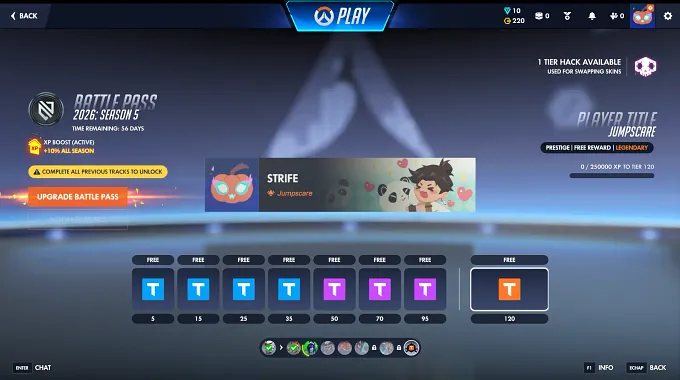
So you have a lot of grinding to do if you want to reach Prestige Level 120 for the Jumpscare title, but it is worth it.
How to Change Your Title
For those who did not know, you can change the title that is displayed under your name at any given time through the character customization menu. This is the same place where you can swap out your player icon and name cards as well.
Simply click on your profile - customization - player titles, and you can sort through the ones you own, pick the best one, and apply it.
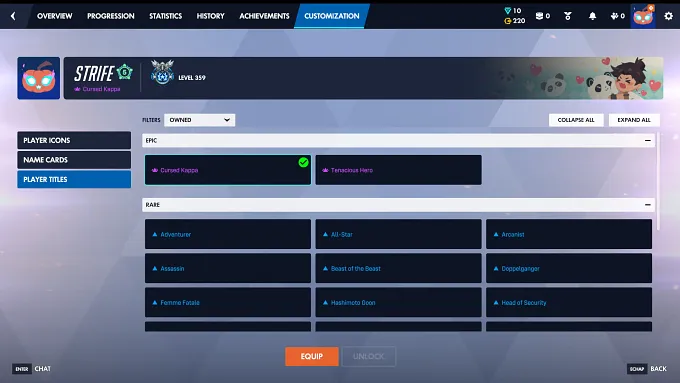
And there you go, you are now set for your next match!
If you want to learn more about Overwatch, check out our latest news as well.