WoW Forever adds a feature so viewers can check streamer builds
The Forever Armory extension lets you inspect a streamer's equipment and even talent build.


Have you ever watched a stream and wondered what gear someone was wearing, or the exact build they had? Or maybe you are a streamer and a bit sick of having to constantly answer questions about your current gear.
WoW Forever streamers can now let viewers check their characters with the new "Forever Armory" Twitch extension.
It displays a streamer's equipment and talent build directly on their channel, and viewers can inspect the full character without asking for every item or ability.
Twitch added the extension as part of their WoW Forever launch celebrations.
How Streamers Can Install Forever Armory
Making it work requires a couple of extra steps:
Open your Twitch Creator Dashboard
Search for the "Forever Armory extension"
Add it to your channel and follow the activation instructions
You will also need the "Forever Armory Export" companion addon. You need that because this is what will capture your currently played character's information.
It records details such as your character's level, class, faction, equipped items, and talent trees.
Without the addon, it will not work. And do not worry, the addon does not send this information directly to Twitch.
Once everything is configured, the extension can display your character information on your Twitch, and viewers can just inspect it.
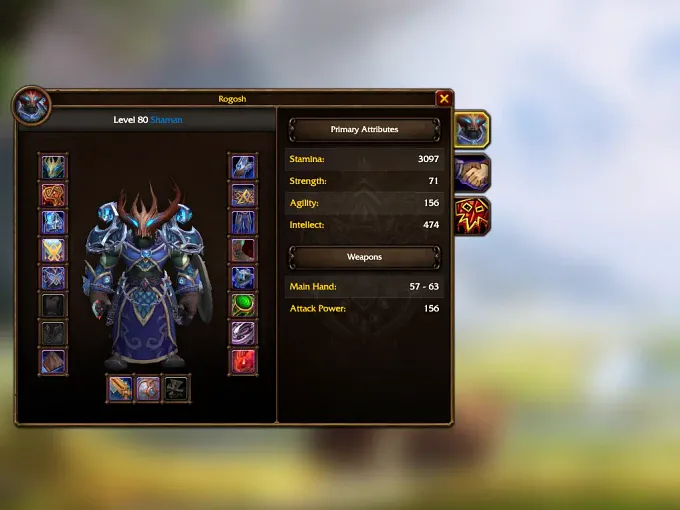
If you change your equipment or talents during a stream, it should get updated live as you play. However, keep in mind that whatever is displayed on Twitch may come with a small delay after you make changes.
If the changes are not appearing after a few minutes, you might need to hit the refresh button.
How Can You Inspect a Streamer's Character
The most important part is that you need to watch someone who has the extension activated and working.
If a streamer has enabled the Forever Armory, you can use the extension on your Twitch channel to check the current character's equipment and talents.
It is honestly nice for both viewers and streamers. As a streamer, you spend less time having to open your character tab to show your gear and talents manually, and as a viewer, you do not have to wait for anyone to answer your questions, and you can just check it out directly.
Just remember that it is not automatically on ALL streams. The streamer needs to activate the extension and the addon. And for viewers, you should have a button on the Twitch screen of the stream that you can interact with, and that will let you inspect the gear and talents.
For more information about WoW Forever, check out our latest news.