Diablo 4 Season 16 PTR opens today, and there is a lot to test
The PC test runs until November 3, with new War Plans, Horadric Items, and endgame changes.


The Diablo 4 Season 16 PTR will start today for PC players, and there is a lot to test, so this is the perfect time to go over everything.
PTR opens on October 27 at 10:00 a.m. PDT / 18:00 CET, and it will end on November 3rd at 10:00 a.m. PST / 19:00 CET.
You can only join the PTR through Battle.net or the Xbox App for PC Game Pass players. Sadly, console players cannot participate in the test realm.
How to Join the Diablo 4 Season 16 PTR
There are a few easy steps to follow if you want to join:
Open the Blizzard Battle.net App and select Diablo IV from your Games list.
In the selector above the Play button, there is a game version drop-down menu.
Select the Public Test Realm option
Click "Install" to install the PTR client. This becomes a Play button when ready.
Click Play to log in to the PTR, and select any of the available Test Servers.
Create a new test character.
Note: Create a Seasonal Character for any testing related to the Seasonal themes.
Enter the game and test the 3.3.0 PTR!
For PC Game Pass and Game Pass Ultimate players, it works exactly the same, but you do it through the Xbox App instead of the Battle.net launcher.
How to Boost a Character
As always, PTR offers a boost for your characters. You can talk to the PTR vendor Mrak dancing near any main town's Waypoint.
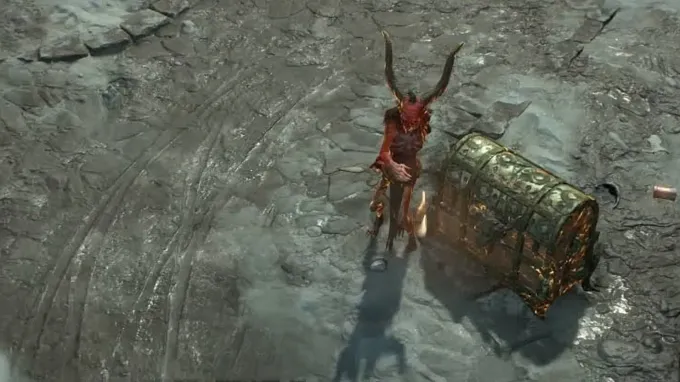
Using him will grant you the following boosts:
Crafting & Materials
Grant Gold
Grant Obols
Grant All Materials
Unlock Masterworking
Grant All Temper Manuals
Grant Lair Keys
Grant Tributes
Grant Infernal Compasses
Grant Nightmare Escalation Sigils
Equipment
Grant All Runes
Max All Aspects
Grant Random Legendaries
Grant All Uniques
Grant Talisman Items
Note: To receive Helms and Amulets from the PTR Boost, you must be at least Level 7 and Level 15 respectively. Please level past this point to receive these specific items.
Paragon
Grant All Glyphs
Max All Glyphs
Progression
Complete Campaign & All Strongholds (Unlocks Whispers and the Artificer’s Obelisk)
Set Level to 70
Unlock All Waypoints & Reveal Map
Grant Skill and Paragon Point Rewards
Unlock and Max War Plans (Drops 3 Marks of El'druin and 20 Marks of Wisdom)
Unlock All Torment Tiers
Set Paragon to Level 200
Seasonal
Max Tyrael's Boons
Grant Seasonal Items (Horadric Items)
What Exactly Should You Test?
So now that you boosted yourself and you are here with a maxed-out character, what exactly should you look out for in this PTR?
The goal is to test the new features and activities and give some useful feedback to Blizzard, so they can adjust things for the launch of the season.
This is why you should make sure you test the following things:
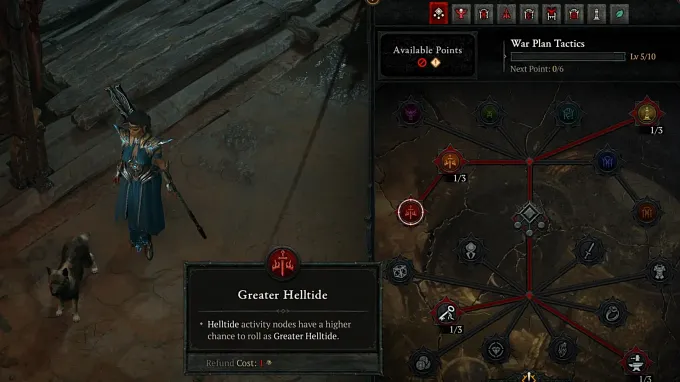
The new meta progression system that allows you to increase the chances of getting specific War Plan activities and rewards
So basically, farm War Plans
The new equivalent of Seasonal Blessings
Test the different paths and check if they are worth it
The new supercharge charm bonuses
When you boost a character, you will most likely get a few of these new items. Make sure to equip them and check how it really works combined with your normal charm sets
Test the new Dual Lair Boss fight
Reworked endgame activities
Infernal Hordes, Pit, and Lair Boss activities have apparently been reworked, so you might want to check these out
And these are the main things you should go through during this PTR. Obviously, you should test your favorite class as well, and check if any of the balance changes have modified the build you usually play.
How to Report Bugs and Share Feedback
If you notice anything unusual, buggy, or that does not seem to work properly, make sure to report it. And if you feel like any new activity should be changed, make sure to also send your feedback to Blizzard.
This is what a PTR is for.
You can report bugs and provide feedback through the in-game feedback tool. Press the ESC Key in the in-game menu, and it will open the "Report a Bug" window. You can then select the feedback tool without leaving the game.