Diablo 4's Season 16 developer livestream finally has a date.
Blizzard will go live on November 24 at 11:00 a.m. PT / 8:00 p.m. CET with more details about the new seasonal content and upcoming changes. They plan to cover the seasonal quest, a revamped dual Lair Boss encounter, new War Plans trees, Horadric Items, and class balance updates.
What Will Blizzard Show During the Season 16 Livestream?
It will cover most of the stuff we already saw during PTR, such as:
Two new War Plans trees, War Plans Tactics and Tyrael's Boons
Horadric Items, a new type of Legendary with Horadric Affixes that synergize with the Talisman system
More details on updates to existing War Plans activity trees
Class balance updates
The seasonal quest will also be revealed, with the new revamped dual Seasonal Lair Boss encounter. Blizzard also mentioned changes made to the normal War Plan activity trees, so you will be able to discover all of that.
As usual, the stream will end with a Q&A section where you can ask the developers questions directly.
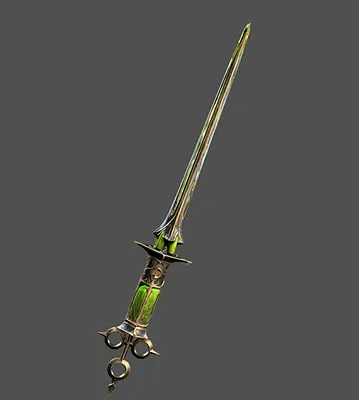
Get a Free Noxoiect Dagger Through Twitch Drops
As always, there is also a cosmetic reward available for anyone who watches the livestream.
During the event, you can watch any Diablo 4 category livestream with Drops enabled for 30 minutes to earn the Noxoiect dagger cosmetic.
You do not have to stay on the official Diablo channel for the entire time. Any eligible stream in the Diablo 4 category counts, so you can also watch your favorite creators covering the developer update.
You have until November 25 at 11:00 a.m. PT, or 8:00 p.m. CET, to get your Dagger. And you need to link your Twitch and Battle.net accounts.
● Blue postBlizzard EntertainmentBlizzard Entertainment2026, November 19
Join our Next Developer Update Livestream
Our next livestream begins on November 24, 2026 at 11:00 AM PT and offers an in-depth look at the new content and features coming with our next update.
Tune in to learn more about the upcoming season, including the seasonal quest and a revamped Seasonal Lair boss fight with two bosses instead of one.
Major updates include two new War Plans trees, War Plans Tactics and Tyrael’s Boons, as well as Horadric Items, a new type of Legendary with Horadric Affixes that synergize with the Talisman system. We’ll also reveal details on updates to existing War Plans activity trees and class balance updates. There will be a Q&A section at the end of the stream for you to ask questions directly to the team.
Visit our official Diablo Twitch, YouTube channels to watch live!
Feast Your Eyes and Claim Your Livestream Drop
While the Developer Update Livestream is live, watch any livestream in the Diablo IV category with drops enabled for 30 minutes to earn the Noxoiect dagger cosmetic!
You have until November 25, 2026 at 11:00 a.m. PT to earn this drop.
Twitch Drops Frequently Asked Questions
Q. Do I need to own an edition of Diablo IV or Lord of Hatred to receive the Twitch Drops?
A. No, owning an edition of Diablo IV or Lord of Hatred is not required to gain progress towards and earn Twitch Drops.
Q. How do I link my Battle.net and Twitch account?
A. Sign into your Battle.net account here and click the Connect link for Twitch, then follow the instructions to sign-in and link your Twitch account to Battle.net.
Q. What devices can I use to earn and claim drops?
A. You can earn and claim drops using your PC or Mac web browser or on the Twitch app for Android or iOS. Twitch apps on game consoles, smart TVs, and other TV apps do not support drops.
Q. Do I need to watch the same channel the entire time to earn my drops?
A. No, you can earn progress towards a drop from watching any eligible channel in the Diablo IV category on Twitch. For example, you can watch half an hour on one channel and then switch to another channel without losing your progress. Progress cannot be earned faster by watching more than one channel at a time. Streams played in the background or with inactive tabs will not count towards the hours watched criteria.
Q. Will I receive my Twitch Drops rewards in-game automatically?
A. No. You must claim the drop on the channel you’re watching or in the Drops Inventory menu on Twitch.
Q. Do Twitch Drop rewards expire?
A. Earned Twitch Drop rewards will expire 7 days after they’ve been claimed if a Battle.net account has not been linked.
Q. As a streamer, how do I get Twitch Drops on my channel?
A. All you need to do is make sure your Twitch and Battle.net accounts are linked, and that you’re opted into Drops (see Drops Streamer Home).